








Australian pay, tax and super — worked out properly
Payslipsy is a set of free calculators for people who are paid, and people who pay others, in Australia. Each tool answers one question well: what you take home from a salary, what an hourly rate is worth over a year, how much of a bonus you keep, what you owe on a study loan, how much super is due under Payday Super, or what a payslip must show. Every calculator uses the current 2026–27 rates published by the Australian Taxation Office and shows its assumptions next to the result, so you can see exactly how a number was reached.
Start with your take-home pay
The calculator above is the quickest way to see your pay after tax. Enter your salary or wage and how often you are paid, and it works out income tax on the resident scale, subtracts the low income tax offset where you qualify, adds the 2% Medicare levy and — if you tick the box — the compulsory repayment on a HELP or other study loan. Results are shown weekly, fortnightly, monthly and annually, alongside the 12% super your employer pays on top. If you're a working holiday maker or a foreign resident for tax purposes, switch the residency option and the rates change to match.
What changed in 2026–27
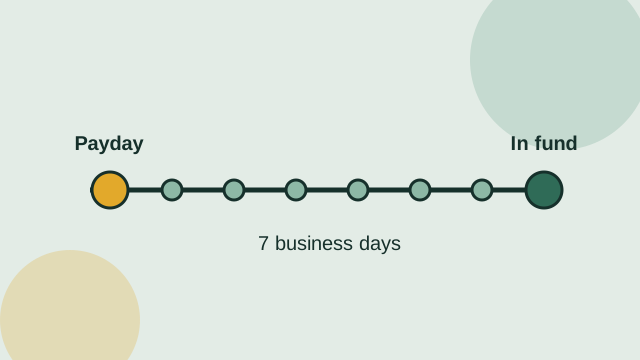
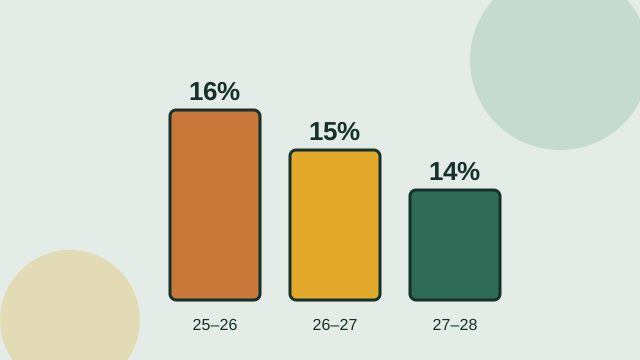
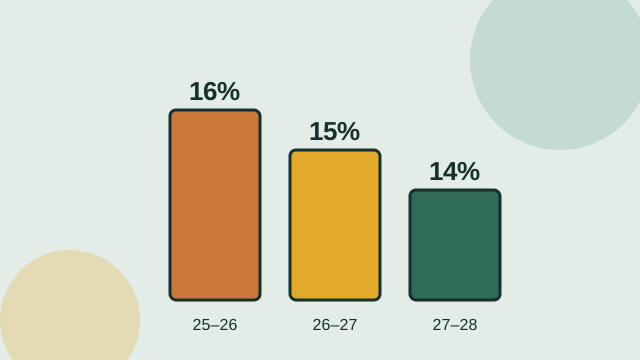
Two changes on 1 July 2026 affect almost every Australian worker. First, the tax rate on income between $18,201 and $45,000 fell from 16% to 15%, saving up to $268 a year; it's legislated to fall again to 14% from 1 July 2027. Second, Payday Super began: employers must now pay super with every pay, and it must reach your fund within seven business days, rather than once a quarter. Study loan thresholds were also indexed, so compulsory HELP repayments now start once repayment income passes $69,528. Our calculators and guides were updated for all three.
Gross pay, net pay and everything between
Gross pay is what you earn before anything is taken out. Net pay — take-home pay — is what reaches your bank account. Between the two sit PAYG withholding, which your employer sends to the ATO as a prepayment of your income tax; the Medicare levy; study loan repayments; and any deductions you've agreed to, such as salary sacrifice or union fees. Super is different: it's paid by your employer on top of your salary into your super fund, so it doesn't come out of your take-home pay unless your contract quotes a package that includes it.
Your payslip shows what was withheld each pay, while the calculators show your position over a whole year. The two can differ slightly because withholding tables round each pay and can't know about deductions you'll claim later. Those differences are settled when you lodge your tax return.
Tools for employees, contractors and employers
Employees can convert an hourly rate to a salary, total their week with the work hours calculator, value a pay rise after tax, work out a part-time pro-rata salary and see how much of a bonus they keep. Graduates can check their HECS-HELP repayment under the new marginal system, and backpackers on 417 or 462 visas can use the working holiday maker tax calculator.
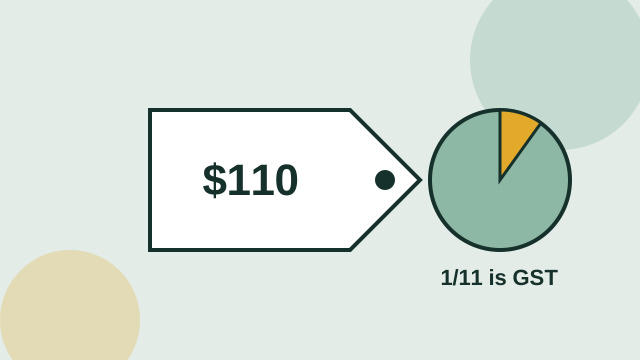
Sole traders on an ABN can turn a day rate into take-home pay with the contractor pay calculator, which separates GST, expenses, super set-aside and tax, and add or remove GST with the GST calculator. Employers and bookkeepers can work out super deadlines with the Payday Super calculator and create a payslip containing the information Fair Work requires with the payslip generator.
How we keep the numbers right
Every tool runs on one shared calculation engine. Rates and thresholds live in a single dated table for each income year, so when the ATO publishes new figures they change everywhere at once. The engine is tested against the ATO's own published examples — including its study loan repayment examples for 2026–27 and the working holiday maker withholding schedule — before any change goes live. Worked examples in our guides are generated from the same engine, so the text can't drift from the calculator. Our methodology page lists every source and what each tool does and doesn't model, and the update log records each change.
Estimates, not advice
The calculators give general estimates based on the information you enter and the official rates for the year you choose. They don't model every personal circumstance — such as work-related deductions, the Medicare levy surcharge, family Medicare thresholds or Division 293 tax — and they aren't financial, tax or legal advice. For decisions that matter, check the ATO's tools or speak with a registered tax agent. If you spot something that looks wrong, tell us and we'll check it against the source.
Private by design
Your salary is your business. All calculations happen in your browser: the amounts you type, including everything in the payslip generator, are never sent to our servers or stored. There are no accounts to create and nothing to download.