GST in Australia
The goods and services tax is a 10% tax on most goods, services and other items sold or consumed in Australia. Businesses registered for GST add it to the price of taxable sales, pay it to the ATO through their business activity statement, and claim back the GST included in their business purchases as GST credits. Some items are GST-free, such as most basic food, many health and education services and exports, and some are input-taxed, such as residential rent and most financial supplies.
How to use the calculator
- Choose whether to add GST to an exclusive price or remove it from an inclusive price.
- Enter the amount.
- Read the GST component, the amount excluding GST and the amount including GST.
The formulas
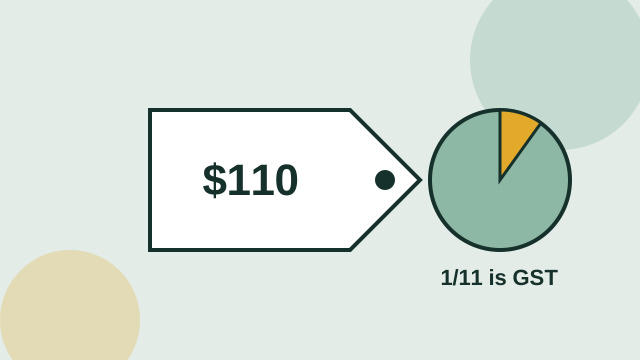
To add GST, multiply the GST-exclusive price by 10% and add it on: $100 becomes $110, with $10 of GST. To remove GST from a GST-inclusive price, divide by 11 to find the GST component: $1,100 includes $100 of GST, leaving $1,000. A common mistake is to take 10% off the inclusive price — that gives $110 off $1,100, which is wrong because the GST was calculated on the smaller exclusive amount.
| GST-inclusive price | GST (÷11) | Exclusive price |
|---|---|---|
| $55.00 | $5.00 | $50.00 |
| $110.00 | $10.00 | $100.00 |
| $550.00 | $50.00 | $500.00 |
| $1,100.00 | $100.00 | $1,000.00 |
| $11,000.00 | $1,000.00 | $10,000.00 |
Who needs to register
You must register for GST when your GST turnover — gross business income excluding GST, not profit — reaches $75,000 a year, or $150,000 for non-profit bodies. Taxi and ride-sourcing drivers must register from their first dollar regardless of turnover. Below the threshold registration is optional; registering lets you claim GST credits but means charging GST and lodging activity statements. The contractor pay calculator flags when your revenue crosses the threshold.
Tax invoices
A registered business must issue a tax invoice for taxable sales of more than $82.50 including GST when the customer asks. The invoice needs your ABN, the words "tax invoice", the date, a description of what was sold and either the GST amount or a statement that the total includes GST. For sales of $1,000 or more it also needs the buyer's identity or ABN.
Rounding
The calculator rounds the GST to the nearest cent. When an invoice has several taxable lines you can round per line or on the invoice total; whichever method you use should be applied consistently. Small one-cent differences between methods are normal.
GST and your income
GST you collect is not your income and is not included in your taxable income. Likewise, if you are registered you claim GST credits rather than deducting the GST on your expenses. Keep a separate account for the GST you collect so it is ready when your BAS is due.
GST on common transactions
Some quick reference points for sole traders and small businesses. A contractor invoicing $8,000 for a month's work adds $800 GST, invoicing $8,800 in total. A café selling a $5.50 coffee includes $0.50 GST. A tradesperson quoting a job at $3,300 "inc GST" will receive $3,000 for the work and $300 that must be remitted. Basic food such as bread, milk and fresh fruit is GST-free, so a mixed grocery receipt has GST only on the taxable items.
Claiming GST credits
If you're registered, you can generally claim the GST included in business purchases as a credit on your BAS, provided you hold a valid tax invoice for purchases over $82.50. Use the "remove GST" option to find the credit on each receipt: a $440 purchase includes $40 you can claim. Purchases that are GST-free or input-taxed don't carry a credit, and private use must be excluded.
Whichever direction you calculate, keep the GST-exclusive figure for your income records and the GST figure for your BAS. Mixing the two is the most common bookkeeping error for new sole traders.
Frequently asked questions
How do I calculate GST from a total price?
Divide the GST-inclusive total by 11. For example, $1,100 ÷ 11 = $100 of GST.
How do I add GST to a price?
Multiply the price by 1.1. A $500 price becomes $550 including $50 GST.
Is GST 10% in every state?
Yes. GST is a federal tax and is 10% everywhere in Australia.
When do I have to register for GST?
When your GST turnover reaches $75,000 a year ($150,000 for non-profits), or from the start if you provide taxi or ride-sourcing services.
Why can't I just take 10% off the total?
Because GST is 10% of the exclusive price. Taking 10% off the inclusive price removes too much; dividing by 11 gives the right figure.